Eight-channel audio/CV breakout box
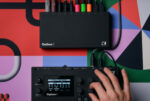
Outbox 8 is a versatile eight-channel audio/CV breakout box and USB host/device designed to expand your connectivity, with creative possibilities to boot. It adds eight fully configurable physical outputs to a compatible connected device, letting you send audio and CV in any combination its capabilities allow. Route your sound and control wherever the moment calls for.
Send audio
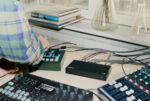
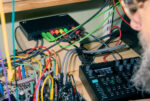
Outbox 8 enables you to route individual tracks for external processing, mixing, or performance – creating a flexible bridge between your Elektron workflow and the wider world of sound and control.
MIDI to CV
With Outbox 8, you can assign outputs to CV duties – pitch, gate, trig, linear value, or clock. Use it as a dedicated USB MIDI-to-CV converter to play, sequence, modulate, and synchronize modular systems and other CV-capable instruments. Or connect a MIDI controller to play and control them directly.
This makes it easy to integrate MIDI controllers with modular setups – combining the familiarity of keys and performance gestures with the flexibility of voltage-controlled sound.

Eight-output computer audio
Connect Outbox 8 to your computer, tablet, or phone and use it as an eight-output USB audio interface – ideal for clean, portable, and reliable setups. You can route audio directly from your DAW to monitors, mixers, or external hardware using a single streamlined device.
At the same time, MIDI from your DAW can be sent to Outbox 8, allowing any of its outputs to be configured to send CV. This lets your computer sequence modular gear, control analog synthesizers, or synchronize external devices – and extends your studio beyond the screen and into hands-on soundcraft.

In-device or web app setup
For many Elektron boxes you are able to set up Outbox 8 in-device. Just connect and control. Outbox 8 can work a little differently depending on your machine, so check this page’s Compatibility Matrix.
For others, and a wide range of non-Elektron USB class-compliant devices, you can configure Outbox 8 by using the Outbox 8 Web App – available here (please ensure your browser is able to run Web MIDI).
Audio/MIDI compatibility can vary by manufacturer and firmware. Many will work with MIDI, some with audio, and some with both. See our Outbox 8 Audio Compatibility Wiki on Elektronauts – here – to see which non-Elektron devices have been confirmed as working with Outbox 8.
Compatibility Matrix
|
|
Multi track |
Two track* |
USB | DIN or TRS** | In– device |
Web app |
mixer |
|
Digitakt I/II |
X |
X |
X |
X |
X |
||
|
Digitone |
X |
X |
X |
X |
X |
||
|
Syntakt |
X |
X |
X |
X |
X |
||
|
Analog Rytm |
X |
X |
X |
X |
|||
|
Analog Rytm |
X |
X |
X |
X |
|||
|
Analog Four |
X |
X |
X |
X |
|||
|
Analog Four |
X |
X |
X |
X |
|||
|
Tonverk*** |
X |
X |
X |
X |
|||
|
Analog Heat |
|
X |
X |
||||
|
Model:Sample |
X |
X |
X |
X |
|||
|
Model:Cycles |
X |
X |
X |
X |
|||
|
Octatrack |
X |
X |
|
||||
|
Machinedrum |
|
|
|
X |
|
X | |
|
Monomachine |
|
|
|
X |
|
X |
* Model:Samples and Model:Cycles can only route the audio from the main outputs.
** DIN or TRS MIDI needs to be converted to USB MIDI using a class-compliant MIDI-USB interface.
*** Currently limited functionality: High audio streaming latency and no in-device setup. There may also be host/device connectivity issues, meaning you may need to reconnect to Tonverk several times. Please see the Outbox 8 manual for more info. All of this is being worked on for upcoming Tonverk OSes.
On Digitakt II and Digitone I/II, you can configure audio outputs in-device as either individual mono outputs or as combined stereo pairs.
Connectivity
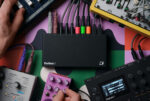
Alongside your eight audio/CV outputs are two USB-C ports, one for connecting to your device or computer, and one for power input when needed.
However you’re setting up, the front-panel LED keeps you in the loop, communicating connection and configuration status at a glance.
Specifications
Features
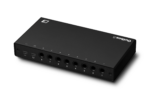
- 8 × 1/4” impedance-balanced DC-coupled audio/CV outputs
- 48 kHz, 32-bit D/A converters
- CV output range: +/- 5 V
- CV signal types: GROUNDED, PITCH V/OCT, PITCH HZ/V, LINEAR VALUE, TRIG, GATE, and CLOCK
- 1 × USB Type-C power input
- 1 × USB 2.0 High-Speed Type-C data port, supporting USB Power Delivery, dual-role data and dual-role power
- 1 × status LED
- Power requirement: 5 V / 0.5 A / 2.5 W or higher
Physical specifications
- Dimensions: W 176 × D 90 × H 28 mm (including feet)
- Weight: approximately 0.35 kg
Miscellaneous
- Class-compliant USB Audio
- 3 year Elektron warranty
Included in the box
- Quick guide
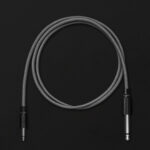
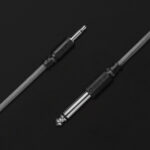
- Elektron USB-C to USB-B cable
Support & Downloads
The latest manuals and FAQ can be found in the Outbox 8 support section.